You pay per tenant, never per device, so your price stays the same as your fleet grows. Protect one tenant for free. Control change with Pro. Standardize customer tenants with MSP. Prices in EUR, excluding VAT.
Plans
Community Free
For admins who want a real safety net for one tenant.
Free
Unlimited devices, no per device fees
Forever. No paid license or TenuVault web account.
Supported Intune configuration types, with assignments
Encrypted local storage with a recovery key
30 days of backup history
Restore single items, unlimited
Drift detection with diffs
OpenIntuneBaseline deployment, comparison and validation
Supported framework mappings except CIS, with PDF, CSV and JSON reports
Recommended
Pro
For organizations that must recover fast and control change.
€49per month
Excl. VAT. Business tax IDs accepted.
Unlimited devices, no per device fees
2 tenants, billed monthly.
Everything in Community, plus
2 tenants, for example production and test
Full backup restore and replace in place
One click revert of drifted policies
Daily schedules and custom retention
Backups in your own Azure storage account
Baseline management: create only what is missing
Restore and change audit log
Up to 5 installations per tenant
Email support
Dev → Prod promotion of supported Settings Catalog settings
Dashboard scores for OIB and supported frameworks
Policy conflict and hygiene explorer
Versioned custom baselines and reviewed upgrades
Scheduled health review and opt-in notifications
Coming soon to Pro
CIS Benchmarks Level 1 and Level 2 assessment and reports
MSP
For service providers and organizations with 5 or more tenants.
from€99per month
Excl. VAT. Business tax IDs accepted.
Unlimited devices, no per device fees
Includes 5 tenants. Additional tenants per month: €15 for tenants 6 to 25, €10 for tenants 26+.
Everything in Pro, plus
Includes 5 tenant slots, add more as you grow
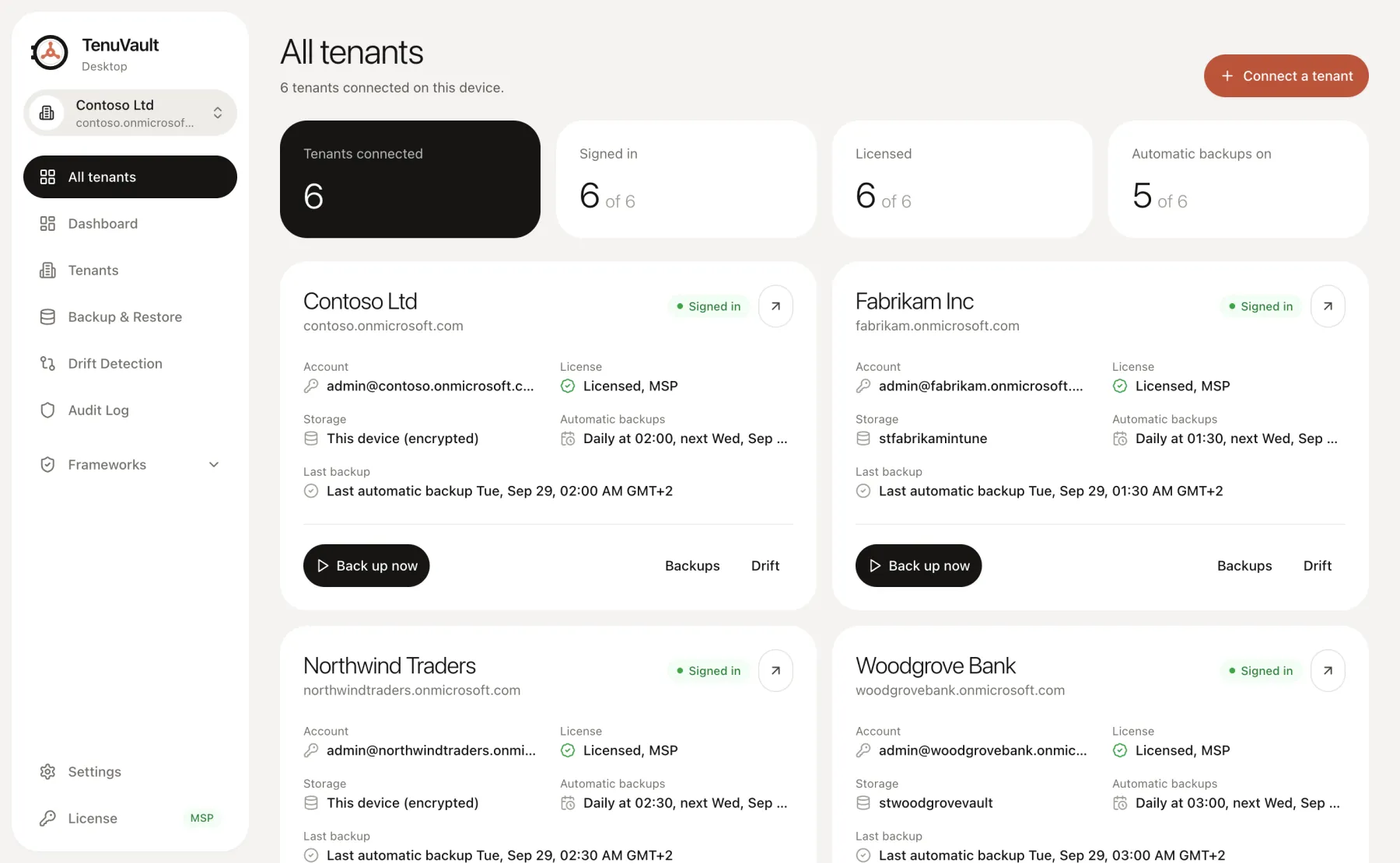
All tenants in one app with a tenant switcher
Cross tenant dashboard for backups and drift
Bulk restore and baseline rollout across tenants
Per tenant schedules and storage
Optional license sharing with a customer tenant
Priority email support
Versioned customer standards and overlays
Need an invoice, purchase order or quote? Email us
Estimate your MSP price
Includes 5 tenants. Each additional tenant is priced within its band, with a lower rate from tenant 26.
10 tenants per month€174
Average per tenant€17.40
Estimate in EUR, excluding VAT. Choose your total tenant slots at checkout. Existing MSP subscriptions use their current billing model.
Pro and MSP checkout are available now; your license key arrives by email. Both include a 30 day free trial. CIS support remains pending the commercial-use agreement.
Compare plans feature by feature
Compare implemented workflows and their supported scope. CIS support remains unavailable pending the commercial-use agreement.
On smaller screens, scroll the table horizontally to compare all three plans.
Implemented workflows and pending CIS support in each TenuVault Desktop plan. MSP includes every Pro benefit. CIS remains pending.
No TenuVault web account for tenant operationsSign in to Microsoft from the desktop app with delegated permissions.
Included
Included
Included
Encryption, recovery key and restore safety checks
Included
Included
Included
Backup
Manual backups
Included
Included
Included
Weekly scheduled backupsSchedules run while the desktop app can operate in an active user session; the computer must be awake.
Included
Included
Included
Backup download and drift CSV/JSON export
Included
Included
Included
Daily scheduled backups
Not included
Included
Included
Backups encrypted on this device
Included
Included
Included
Backups in your own Azure storage account
Not included
Included
Included
Backup history
Up to 30 days
7 to 365 days, or forever
Restore
Restore one item as a copy
Included
Included
Included
Restore several items at once
Not included
Included
Included
Replace items in place
Not included
Included
Included
Restore assignments
Not included
Included
Included
Copy items to other tenants when restoring
Not included
Not included
Included
Drift detection and audit
Compare backups and detect drift
Included
Included
Included
One click revert of drifted policies
Not included
Included
Included
Audit log
Not included
Included
Included
Cross tenant dashboard, including Check all for drift
Not included
Not included
Included
OpenIntuneBaseline
Deploy OpenIntuneBaseline as new policiesWindows, macOS, Windows 365 and BYOD app protection, using the latest OpenIntuneBaseline version. Each run records the exact version.
Included
Included
Included
Compare existing deployments and validate policies for drift
Included
Included
Included
Policy selection that matches your licensingBusiness Premium or Enterprise, Defender for Endpoint and Autopatch.
Included
Included
Included
Undo a deployment
Included
Included
Included
Update existing policies in place and fix driftA backup is taken first.
Not included
Included
Included
Deploy to several tenants at once
Not included
Not included
Included
Frameworks
Framework PDF reports and CSV/JSON exportsAvailable for every framework below except CIS. Reports show evaluated coverage and unknowns; they do not certify compliance.
Included
Included
Included
OpenIntuneBaseline
Included
Included
Included
Microsoft Security BaselinesImport the Settings Catalog policies of your selected baseline.
Included
Included
Included
UK NCSC Device Security Guidance configuration packsRead-only comparison with nine Windows Settings Catalog policies from the public NCSC configuration pack, pinned to a reviewed source version and used under Apache License 2.0. No endorsement by NCSC.
Included
Included
Included
NIST CSF 2.0
Included
Included
Included
NIST SP 800-53 Rev. 5
Included
Included
Included
NIST SP 800-171 Rev. 3 and Rev. 2
Included
Included
Included
ISO/IEC 27001:2022
Included
Included
Included
SOC 2
Included
Included
Included
ASD Essential Eight
Included
Included
Included
BSI IT-Grundschutz
Included
Included
Included
UK MOD Def Stan 05-138
Included
Included
Included
Cyber Essentials
Included
Included
Included
DISA STIGImport reviewed Settings Catalog mappings for a specific STIG.
Included
Included
Included
Custom baselines
Included
Included
Included
Customize OpenIntuneBaselineChoose latest main or a published platform release, customize its supported Settings Catalog policies, deploy through a reviewed change set and compare your version with newer OpenIntuneBaseline source versions.
Not included
Included
Included
Company baseline from a tenant snapshotTurn supported Settings Catalog policies from a tenant snapshot into a versioned baseline, edit it in the app, compare it with supported framework mappings and deploy through a reviewed change set.
Not included
Included
Included
CIS Benchmarks Level 1 and Level 2Coming soonCIS assessment and reports remain unavailable pending the commercial-use agreement. Your own licensed benchmark content will still be required.
Not included
Included
Included
Teams and tenants
Share the license with other admins in your tenant
Not included
On by default
Off by default
Back up several tenants at once with Backup Selected
Not included
Not included
Included
Assessment and reporting
Dashboard baseline scoresSaved OIB validations of selected deployed policies and supported native framework comparisons: gaps, assessment date and comparable trends. Scores show evaluated coverage and unknowns; they do not certify compliance.
Not included
Per-framework scores and coverage
Per-tenant scores and portfolio drill-down
Policy conflict and hygiene explorerFind candidate conflicting settings, duplicate profiles, missing targeting and broken references for admin review.
Not included
Included
Per-customer findings and fleet queue
Controlled change and recovery
Dev → Prod settings syncTest OIB or supported framework settings in development, then promote selected settings between Pro’s two licensed organization tenants. Start with supported Settings Catalog policies, with a diff, target dependency review, production backup, confirmation and read-back verification. One-way and admin-started; assignments need separate review.
Not included
Reviewed promotion between two tenants
Reviewed promotion between licensed tenants
Baseline upgrades preserving customizationsFor supported Settings Catalog policies, review installed source, local changes and new upstream settings together; resolve conflicts before applying an upgrade.
Manual comparison
Included
Versioned customer overlays
Scheduled health review and opt-in notificationsReview stale backups on a schedule, using local or customer-controlled notification endpoints.
In-app backup status
Included
Portfolio triage and customer ownership
MSP customer operations
Versioned golden standards and customer overlays
Not included
Organization customizations
Reusable standards, parameters and exceptions
Bulk and cross-tenant actions require MSP on the tenants involved. Pro promotion covers its two licensed organization tenants.
Billing questions
Do you charge per device?+
No. Every plan covers an unlimited number of managed devices. Community is free for one tenant, Pro is a flat price for two tenants and MSP is priced by tenant. Adding devices to a licensed tenant never changes your price.
Can Pro sync settings from development to production?+
Yes. Pro supports reviewed promotion between its two included organization tenants. Test selected OIB or supported framework settings in development, review the diff and dependencies, back up production, then approve and verify the promotion. It starts with supported Settings Catalog policies.
Which features are still pending?+
CIS assessment and reports are unavailable pending the commercial-use agreement. The other listed workflows are implemented in the desktop app, subject to their supported policy scope and plan. Non-CIS framework PDF, CSV and JSON reports are included in Community.
How does the free trial work?+
Pro and MSP start with a 30 day free trial. Your license key arrives by email right after checkout, and you are not charged until the trial ends. Cancel before it runs out and the trial ends without a charge.
How do I cancel or change my plan?+
Manage invoices, payment details and your subscription in the customer portal. When a subscription ends, the app falls back to Community; stored backups are retained and Community limits apply.
What happens when a subscription ends?+
The app falls back to Community. Your backups remain in their storage location; access follows Community tenant and storage limits. Paid recovery and Azure features require an active subscription.
How does the MSP plan count tenants?+
The new offer includes 5 active tenant slots for €99 per month or €990 per year. Additional tenants 6–25 cost €15 per month each (€150 per year); tenant 26 onwards costs €10 per month each (€100 per year). Each rate applies only within its band. Choose your total tenant slots at checkout. Existing MSP subscriptions use their current billing model; manage them in the customer portal.
Can my whole team use one Pro license?+
Yes. A Pro license is shared with the key holder's tenant by default, so other admins in that tenant only sign in. MSP keys share with a customer tenant only when you turn it on.
How many computers can use one license?+
Up to 5 installations of the desktop app per licensed tenant. This counts the admin computers running TenuVault, not the devices you manage in Intune, which are unlimited. Deactivate an installation from the License page to free its slot.
What happens when I am offline?+
The app checks its license every few hours. After a successful check it keeps working offline for 14 days.
Take your first backup today
Install, run the setup script, sign in. Your first backup is a few minutes away.