 TenuVaultDesktop
TenuVault Desktop
Intune backup: back up and restore Microsoft Intune policies
TenuVault is a desktop app for Windows and macOS that backs up and restores Microsoft Intune configuration through Microsoft Graph, using your own delegated admin sign-in. It saves policies, scripts, apps and their assignments as encrypted snapshots on your computer or in your own Azure storage, and restores them as reviewed copies or in place. Scheduled backups use Everything except apps until you save a different choice for the tenant.
At a glance
- TenuVault runs on Windows and macOS and reads Intune through Microsoft Graph with the signed-in administrator's delegated permissions.
- A TenuVault backup covers 39 Intune object types in nine areas, with assignments where Intune has them.
- Every TenuVault backup is encrypted with AES-256-GCM on the admin's computer before it is written to disk or uploaded.
- TenuVault Community stores backups on the device; Pro and MSP can also store them in your own Azure storage account.
- TenuVault Community is free for one tenant with manual and weekly backups and 30 days of history; Pro adds daily schedules, custom retention, replace in place and assignment restore for two tenants.
- Tenant data and your Microsoft access token never reach a TenuVault server; the app talks to Microsoft for sign-in, Microsoft Graph and Azure, to GitHub for updates and OpenIntuneBaseline files, and to tenuvault.com for license checks.
Does Intune have built-in backup?
No. Microsoft documents no recycle bin, soft delete or version history for Intune policies, and no restore path for a deleted policy; the documented recovery approach is to recreate it from a prior export or backup.
The closest native tool is the settings catalog export: you export one policy to a .json file and import it to create a new policy. Microsoft does not say whether assignments are included.
For tenant migration, Microsoft points to Graph and PowerShell sample scripts and warns: "The scripts don't export and import every policy, such as certificate profiles."
Tenant Configuration Management (TCM), part of Microsoft Entra Tenant Governance, snapshots 67 Intune resource types, but not apps, scripts or remediations. Microsoft states: "A snapshot is retained for a maximum of seven days, after which it is automatically deleted." The base quota is stated as: "You can extract a maximum of 20000 resources per tenant per month." Monitors run in monitorOnly mode, so TCM detects drift but does not restore.
TCM base capacity comes with Microsoft Entra ID P1 or P2, included in Microsoft 365 E3, E5 and Business Premium. Entra ID Governance licenses add capacity; Entra ID Free gets none.
Windows settings backup and restore, formerly Windows Backup for Organizations, supports "backup and restore of Windows settings and the list of installed Microsoft Store apps only". Microsoft Entra Backup and Recovery covers no Intune objects.
Intune audit logs show who changed what, and you can "use Graph API to get two years of audit events". They record changed properties, not full policy content, so they cannot rebuild a deleted policy.
- Guide: does Microsoft Intune have a built-in backup?
- Microsoft Learn: settings catalog import and export
- Microsoft Learn: tenant to tenant migration scripts
- Microsoft Learn: Tenant Configuration Management API limits
- Microsoft Learn: Tenant Governance licensing
- Microsoft Learn: Windows settings backup and restore FAQ
- Microsoft Learn: Intune audit logs
What TenuVault backs up
TenuVault backs up 39 Intune object types in nine areas. Each object is saved as Microsoft Graph (beta) returns it, with its settings and, where Intune has them, its assignments. Choose Everything, Everything except apps, or a custom selection. Scheduled backups use Everything except apps until you save a different choice for the tenant, so include apps explicitly if you need them.
Not part of the backup:
- App installer files; apps are saved as their Intune details.
- The Entra groups that assignments reference.
- Apple and Android Enterprise enrollment tokens, and built-in objects Intune recreates itself.
- Enrolled devices, and types your permissions cannot read; the log reports them.
| Area | Object types | Assignments saved |
|---|---|---|
| Device configuration | Device configuration profiles, including custom OMA-URI profiles and Windows update rings; settings catalog and endpoint security policies; administrative templates; reusable settings; BIOS configurations | Yes, except reusable settings |
| Compliance | Compliance policies with their noncompliance actions; settings catalog compliance policies; compliance scripts | Yes |
| Endpoint security | Security baselines and template profiles | Yes |
| Scripts and remediations | Windows PowerShell scripts; macOS shell scripts; macOS custom attributes; remediations | Yes |
| Windows updates | Feature update, expedited quality update, hotpatch quality update and driver update profiles | Yes |
| Apps | Apps with their categories, dependency and supersedence links; app categories; policy sets | Yes, except app categories |
| App protection and configuration | App configuration policies for managed devices and for managed apps; iOS, Android and Windows app protection policies | Yes |
| Enrollment | Enrollment configurations; Windows Autopilot deployment profiles; Apple user enrollment profiles; Apple automated device enrollment profiles, and token details for reference only (the token itself must be uploaded again); Android Enterprise enrollment profiles; device categories; terms and conditions | Yes, except Apple automated enrollment, Android Enterprise profiles and device categories |
| Tenant administration | Assignment filters; scope tags; custom Intune roles with their role assignments; compliance notification templates; Company Portal branding; device clean-up rules; multi admin approval policies | Scope tags, Intune roles and Company Portal branding |
What a configuration backup cannot recover
Microsoft Graph does not return app installer payloads, Apple enrollment and content tokens, or private keys, so no Intune backup can contain them.
Plan a separate source for each, and check Recovery readiness in the restore wizard before an incident.
- Win32, line-of-business and MSI apps need their original installer. Store, web and Microsoft 365 apps restore without one.
- Apple automated device enrollment needs its token uploaded again; profiles are kept for reference.
- Restoring configuration does not enroll or migrate devices.
Where backups are stored
Each tenant keeps its backups in one location: encrypted on the device, or encrypted in your own Azure storage account. TenuVault never sends backups to a TenuVault server.
Save the recovery key in a password manager. Without it, backups can only be read on the computer and user account that created them. In Azure, blob names, which include display names, are not encrypted.
Scroll sideways to see all columns.
| Plan | Storage | Encryption | Schedule | Backup history |
|---|---|---|---|---|
| Community | This device or a network share | AES-256-GCM, key protected by Windows DPAPI or the macOS Keychain | Manual and weekly | Cleanup after 30 days |
| Pro | This device or a network share, or your own Azure storage account | AES-256-GCM on your computer before writing or upload | Manual, weekly or daily | 7 to 365 days, or forever |
| MSP | Per tenant: this device or a network share, or a customer-controlled Azure storage account | AES-256-GCM on your computer before writing or upload | Manual, weekly or daily, per tenant | 7 to 365 days, or forever |
How restore works
Every restore starts from a backup snapshot and ends with a review step before TenuVault writes to Intune. The plan decides which methods are available.
Replace in place does not keep the version it overwrites, so back up first. If a write's outcome is uncertain, TenuVault blocks an identical write until you check Intune, which prevents duplicates.
| Method | What it does | Plans |
|---|---|---|
| Create copies | Creates each item next to the current one with a [Restored] name prefix. Existing items never change. Copies are unassigned unless you restore assignments. | All plans. Community restores one item at a time as an unassigned copy. |
| Replace in place | Reads each item from the tenant first. Changed items go back to the backed-up version, deleted items are recreated under their original name with a new ID, and matching items are skipped. | Pro and MSP |
| Restore assignments | Applies the groups and filters recorded in the backup. When replacing, assignments added since the backup are removed. | Pro and MSP |
| Copy to other tenants | Creates unassigned copies in other connected tenants, with their original names and the Default scope tag. | MSP, on every tenant involved |
Schedules and retention
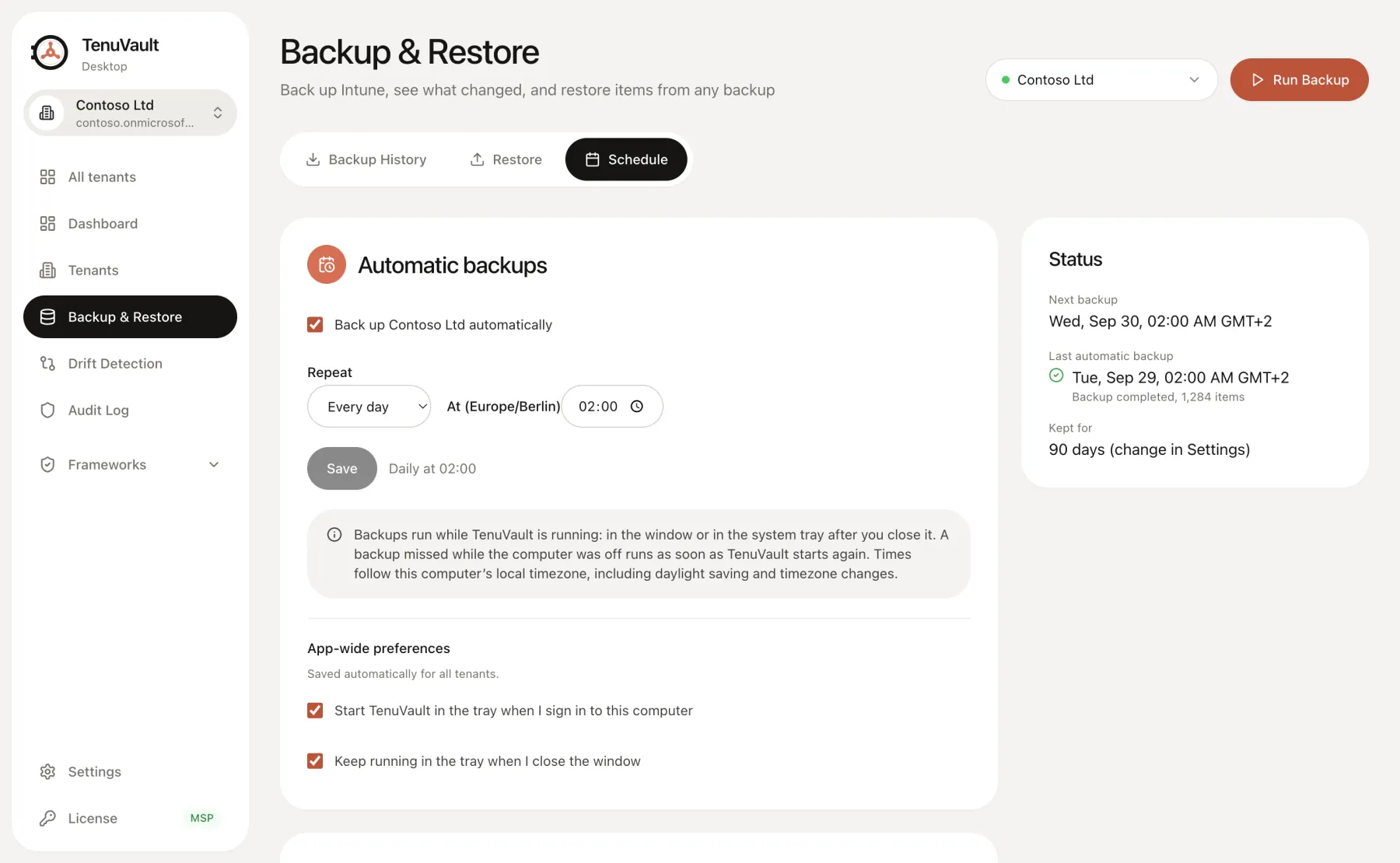
Community schedules a weekly backup; Pro and MSP add daily schedules. Schedules run from the desktop app, so the computer must be awake with TenuVault running in a usable session. It is not an unattended server service.
Retention runs only after a backup that finished without warnings, and the newest backup is always kept. Community removes backups older than 30 days; Pro and MSP keep 7 to 365 days, or forever. The setting applies to every tenant on the computer.
Two complete backups also enable drift detection.
TenuVault compared with Microsoft's built-in options
Two of Microsoft's options save some Intune configuration: a settings catalog JSON export and a Tenant Configuration Management snapshot. Neither runs scheduled backups that you can restore with assignments. The table shows how they differ from TenuVault.
Scroll sideways to see all columns.
| Approach | Restore | Schedule | Assignments | Storage |
|---|---|---|---|---|
| Settings catalog JSON export | Import creates a new policy | None; manual, one policy at a time | Not documented by Microsoft | A JSON file you download |
| Tenant Configuration Management snapshots | None; monitors are monitorOnly and Microsoft says to fix drift in the admin center, PowerShell or Graph | Snapshots run on demand; drift monitors run every six hours | Resources include an Assignments parameter | Kept by Microsoft for a maximum of seven days |
| TenuVault | Copies on all plans; replace in place on Pro and MSP; copies to other tenants on MSP | Weekly on Community; daily on Pro and MSP | Saved where Intune has them; restored on Pro and MSP | Encrypted on your computer or, on Pro and MSP, in your Azure storage |
Set up your first backup
Install TenuVault, have an authorized administrator run the setup script for the app registration, sign in, choose storage and save the recovery key. Run a manual backup and review its log before scheduling.
Then restore one unassigned test policy as a copy and compare its settings. An export count does not prove recovery.
Read the technical guides
Product scope reviewed . Check your installed release and the current plan table before using a workflow.
Frequently asked questions
Does Microsoft Intune have a built-in backup?+
No. Microsoft documents no recycle bin, version history or restore path for deleted Intune policies, and Tenant Configuration Management snapshots are kept for a maximum of seven days with no restore. TenuVault adds scheduled, encrypted Intune backups with a reviewed restore.
How do I back up Intune policies?+
Install TenuVault on Windows or macOS, create the app registration with the setup script, sign in with an Intune admin account and choose storage. Run a manual backup, review it, then schedule weekly or, on Pro and MSP, daily backups.
Are Intune assignments included in a TenuVault backup?+
Yes, where Intune has them. TenuVault saves group and filter references, not the Entra groups themselves. Restoring assignments requires TenuVault Pro or MSP.
Where are TenuVault Intune backups stored?+
TenuVault stores Intune backups encrypted on your computer or a network share; Pro and MSP can also use your own Azure storage account. Backups never go to a TenuVault server.
Is TenuVault free for Intune backup?+
TenuVault Community is free for one Intune tenant with weekly backups and 30 days of history. Pro costs €49 per month for two tenants and MSP starts at €99 per month for five tenant slots, excluding VAT, each with a 30-day trial.
Can I restore a deleted Intune policy?+
Yes, if the policy is in a TenuVault backup. On Pro and MSP, replace in place recreates the deleted Intune policy under its original name with a new ID. On Community, TenuVault restores it as an unassigned copy.
Can I restore Intune configuration to another tenant?+
Yes, on TenuVault MSP. It copies selected items from one connected Intune tenant's backup into others. Copies are never assigned, so you recreate groups and filters in the target tenant.
Does TenuVault back up Intune apps and installer files?+
TenuVault backs up Intune app details and assignments when apps are included; scheduled backups use Everything except apps until you save a different choice for the tenant. Installer files are never downloaded. Store, web and Microsoft 365 apps can be recreated; Win32 and line-of-business apps need their original installer.
How does TenuVault encrypt Intune backups?+
TenuVault encrypts each Intune backup file with AES-256-GCM on the admin's computer before writing or upload, with the key protected by Windows DPAPI or the macOS Keychain. Save the recovery key separately.
Does Intune data leave my tenant when I use TenuVault?+
Intune tenant data and your Microsoft access token never reach a TenuVault server. TenuVault talks to Microsoft for sign-in, Graph and Azure, and to GitHub for updates and OpenIntuneBaseline files. License checks go to tenuvault.com and can include a Microsoft ID token as proof of the tenant; it is verified and never stored.